My Project
A project represents a specific task or set of tasks assigned to a user within an organization. In this HRIS, users can manage their assigned projects efficiently using a Kanban Board.
List of Projects
Each project is represented as a Project Card, containing key details and a Kanban Board for task management.
Project Card
Each project card includes:
- Project ID: A unique identifier automatically assigned to the project.
- Created By: The user who initiated the project.
- User ID: A unique identifier for the user who created the project.
- Created Date: The date when the project was first created.
- Target Completion Date: The expected completion date of the project, set during project creation.
- Project Leader(s): Users responsible for overseeing the project's progress, ensuring goals are met, and providing guidance.
- Project Assignee(s): Users assigned to specific tasks within the project, responsible for execution and completion.
Kanban Board
The Kanban Board provides a visual representation of the project's progress. It include:
- Kanban Cards: Moveable task cards that represent individual project tasks.
Manage Your Kanban Board
To interact with the Kanban Board, you can:
- Drag and drop Kanban Cards to update task status.
- Assign tasks to different users within the project.
- Track project progress based on the card movements across different columns.
Example of a Project
Below is an example of a Project used for project management:
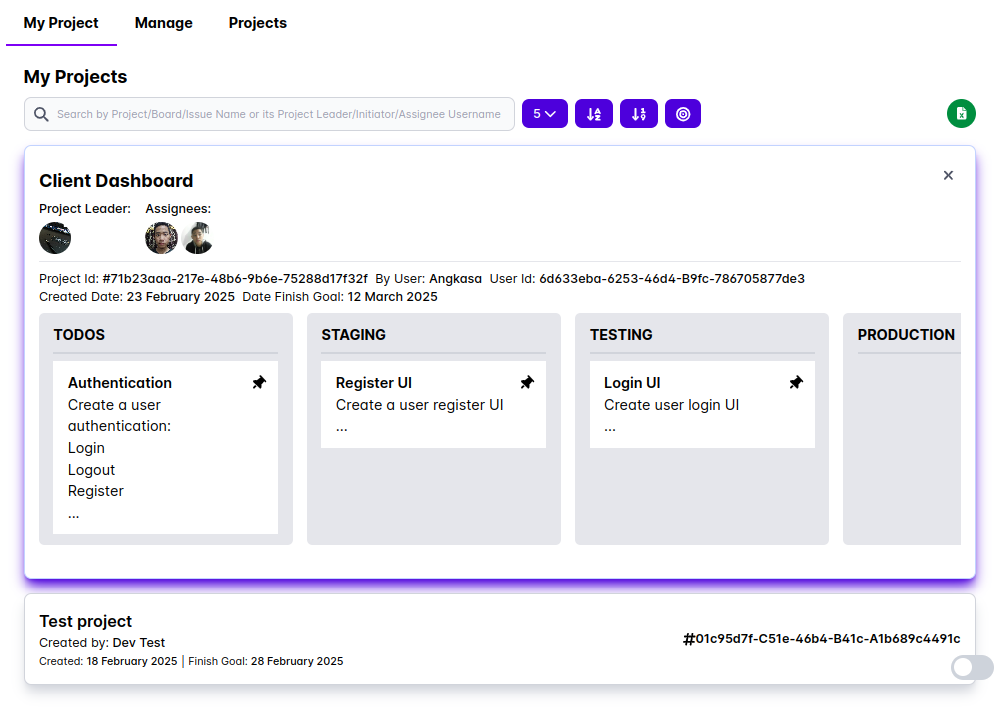
Each card represents a task within the project. Users can move cards between columns as the project progresses.