Control Calendar
The Control Calendar feature allows Admin to manage and monitor organizational schedules, including routine and occasional days off. This helps in maintaining an accurate attendance assessment for users.
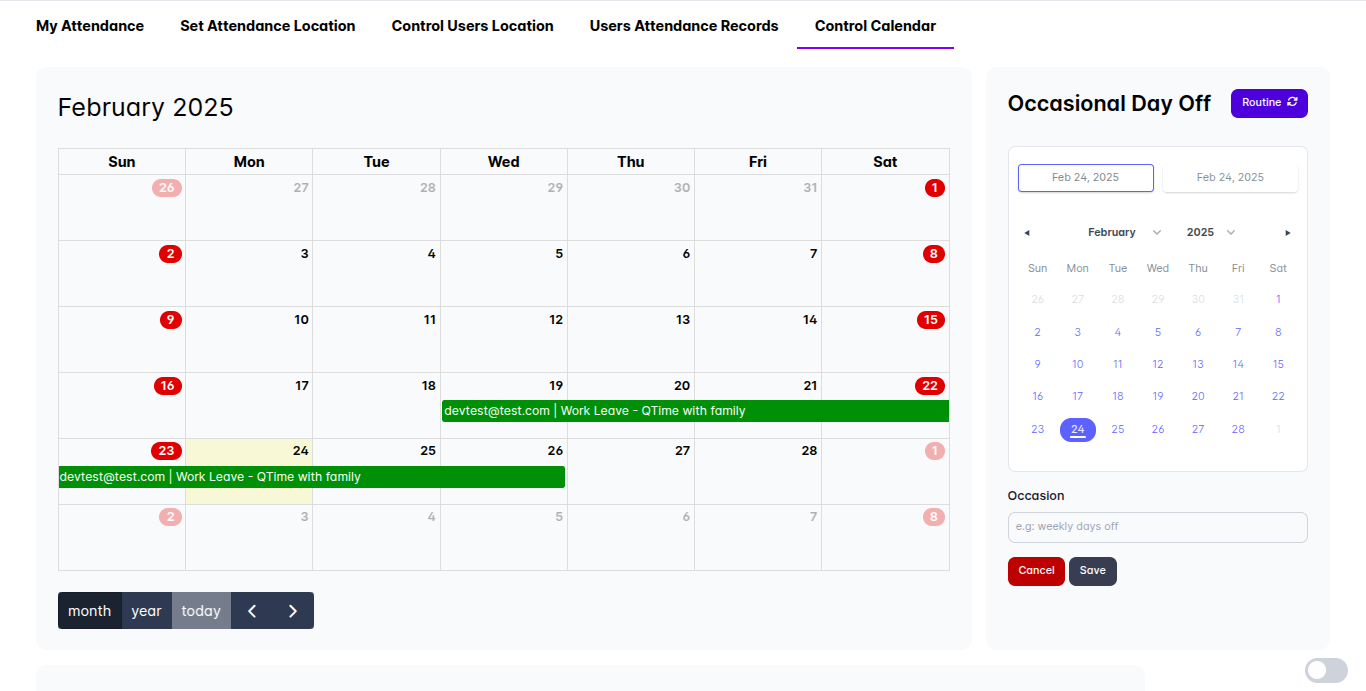
1. Calendar Controller
The Calendar Day Off Controller provides two modes for managing organizational day off:
1.1 Set a Routine Day Off
A routine mode is used to set regular, recurring days off within the organization. For example:
- Every Saturday and Sunday are designated as off days for all users.
- These routine days off will impact the Users Attendance Assessment.
1.2 Set an Occasional Day Off
Occasional days off are one-time or annual holidays specific to the organization. Examples include:
- August 17 (Indonesia Independence Day)
- Custom occasional leave days set by the Admin.
- These days off also affect the Users Attendance Assessment.
Admins can set both routine and occasional days off using this feature to ensure the attendance system correctly reflects non-working days.
2. Calendar View
The Calendar is designed to visually represent scheduled events and non-working days. It marks specific dates with distinct colors for easy identification.
2.1 Marked Events
The calendar highlights the following events:
- User(s) Work Leave Dates
- Routine Day Off Dates
- Occasional Day Off Dates
This feature ensures that admins and users can quickly identify important dates related to attendance and leave policies.
3. Schedules
The Schedules section displays various organizational events, including:
3.1 Ongoing Events
- Shows currently active or upcoming events within the organization.
3.2 Routine Days Off
- Displays the recurring days off set in the Calendar Controller.
3.3 Occasional Days Off
- Highlights specific occasional days off (e.g., public holidays or company-wide leave days).
This section provides a clear overview of non-working days and active organizational events.
4. Calendar Activity Log
The Calendar Activity Log records all changes made in the calendar. This includes modifications to routine and occasional day-offs, providing a history of updates. The log displays:
- Action Taken (e.g., created, deleted, modified day-offs)
- User who made the change
- Date and time of modification
This feature ensures transparency and allows admins to track changes effectively.
By leveraging the Control Calendar, Admins can efficiently manage schedules, track non-working days, and ensure an accurate attendance assessment system.