Control Users Location
The Control Users Location feature allows Admin to view and manage attendance location settings, including assigned attendance locations, shift details and Face Recognition AI status.
1. General Designated Location Detail
On the right top corner of this section, you can see the General Designated Location button. Clicking this button will display the details of the General Designated Location, which serves as the default attendance location setting for all users inside the HRIS.
2. List of Users Attendance Locations
Each user could has a spesific designated assigned attendance location. The List of Users Attendance Locations section provides an overview of all assigned locations, including:
2.1 Attendance Location Details
Each list/card contains detailed attendance location settings for a user, including:
- Attendance Location Type: Specifies whether the location is General, Group, or Individual.
- Attendance Location Place Name: The name of the location where attendance is recorded.
- Attendance Location Coordinates (for non-roaming locations): Displays the exact longitude and latitude.
- Face Recognition AI Status: Indicates whether Face Recognition AI is enabled or disabled for attendance verification.
- Assigned Shift Time:
- Start Time: The time when attendance tracking begins.
- Finish Time: The time when attendance tracking ends.
- Attendance Radius Tolerance: Defines how far a user can be from the designated location while still being able to record attendance.
- User(s) Assignee(s): Lists the user(s) assigned to the attendance location.
2.2 Editable User Attendance Location
To edit an attendance location:
- Click the Show Detail button on the corresponding user's attendance location card.
- A pop-up modal will appear displaying detailed attendance settings.
- Click the Edit button inside the modal to modify the attendance location settings.
Example of Control Users Location View
Below is an example of the Control Users Location interface:
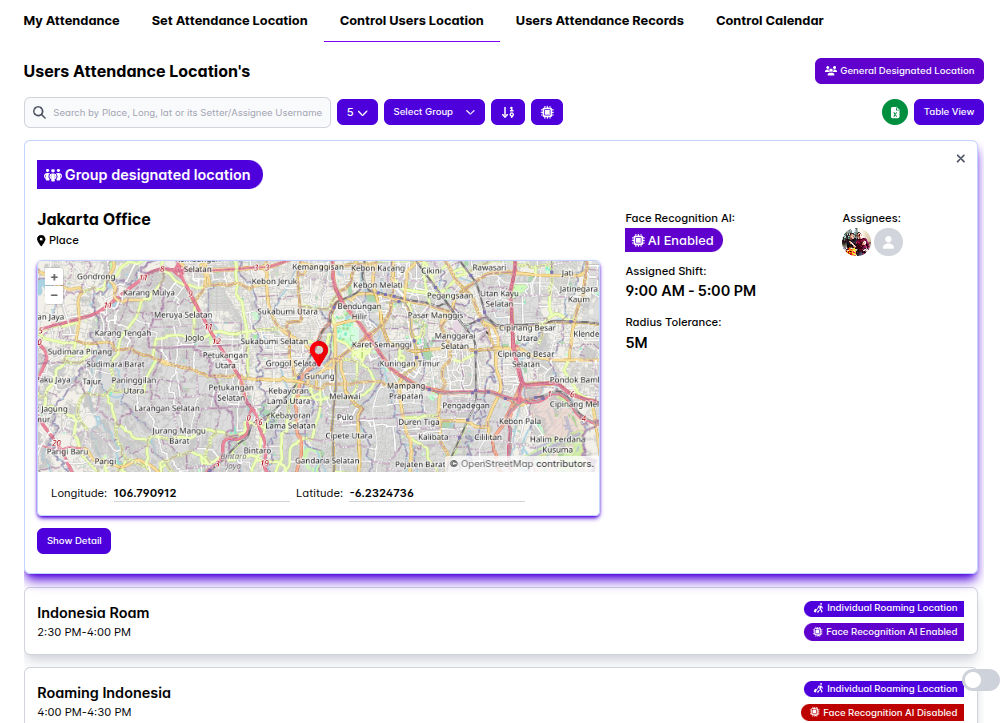
This interface provides an easy way for users to view and manage attendance location settings, shift times and security options.
By using the Control Users Location feature, users can accurately track attendance locations, ensure policy compliance and manage attendance assignments effectively. ✅